
OPPO Demo Unlocker Pro Tool OPPO Demo Unlocker Pro Tool OPPO Demo Unlocker Pro Tool
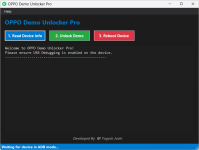
How to Remove Demo Mode (Step-by-Step)
Here is the simple process:
Step 1: Turn on USB DebuggingOpen phone Settings
Go to About Phone
Tap Build Number many times
Enable Developer Options
Turn on USB Debugging
Step 2: Connect the Phone
Use a good USB cable
Connect phone to Windows computer
Step 3: Open the Tool
Run OPPO Demo Unlocker Pro on your PC
Step 4: Read Device Info
Click "Read Device Info"
Make sure your phone is detected
Step 5: Unlock Demo Mode
Click "Unlock Demo"
Wait for a few seconds
Step 6: Restart Phone
Click "Reboot Device"
After restart, Demo Mode will be gone
That’s it. Now your OPPO phone works like a normal device.
Why This Tool is Helpful
Here are some benefits:Very easy to use
No technical knowledge needed
Saves money
Works fast
No need to visit repair shop
Safe method

Unlocker Oppo Demo Mode Tool Pro 2026 - GsmSanjoy.com
Unlocker Oppo Demo Mode Tool Pro 2026

