
MultiFlash Tool V3.0 Free Download
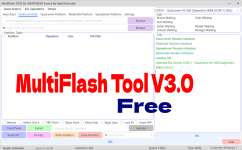
Core Features
Qualcomm Features
- Qualcomm EDL (9008) Flashing
- Cloud Auto Match Loader (No manual file search needed)
- Sahara V2/V3 & Firehose Protocol Support
- Automatic Storage Detection (UFS/eMMC)
- Raw XML Firmware Flashing
- Read, Write, and Erase Partitions
- Smart Key Brute-force
MediaTek (MTK) Features
- BROM & Preloader Mode Support
- Auto Detect Chip & Protocol
- Auth Bypass (Crash/Exploit)
- Unlock & Relock Bootloader
- Format Data & Factory Reset
- Backup & Restore NV (Network Data)
- XFlash & XML Dual Protocol
- RPMB Operations
Spreadtrum (SPD/Unisoc) Features
- PAC Firmware Flashing
- FDL1 & FDL2 Booting
- Read & Write IMEI
- Factory Reset & FRP Reset
- T760/T770 Signature Bypass
- Manual Address Configuration
Fastboot & General Tools
- Read GPT / Partition Table
- Payload.bin Firmware Extractor
- OFP, OZIP, OPS Decryption
- Super Partition Merging
- Sparse to Raw Image Conversion
- Fastboot Information Reader
- Reboot to EDL/Recovery/Normal
Changelog (V3.0 Updates)
- Added: Cloud Loader Matching for Qualcomm (Auto-downloads loaders).
- Added: New Exploits for MediaTek security bypass.
- Fixed: Spreadtrum FDL1/FDL2 connection bugs.
- Improved: UI is now faster and supports Windows 11 better.
- Updated: Internal database for newer chipsets (T760/T770).
How to Use MultiFlash Tool
1. Open the Tool
Download the tool and run it as Administrator. You don't need to install it; it usually runs directly.2. Select Your Platform
Look at the top tabs. If you have a Redmi Note with a MediaTek chip, click on the MTK tab. If you have a Samsung or generic Qualcomm device, click Qualcomm.3. Load the Files
- For MTK: You usually don't need files for simple unlocking. Just click "Auto Detect".
- For Qualcomm: Check the "Cloud Auto Match" box (as seen in the screenshots) so the tool finds the loader for you.
- For Spreadtrum: Double-click the box to select your .PAC firmware file.
4. Connect the Phone
Switch off your mobile. Hold both Volume buttons (Up + Down) and connect the USB cable to your PC.5. Start the Process
Once the tool shows "Port Detected" or "Handshake OK" in the side log window, click the button for what you want to do (like "Format Data" or "Write Partition"). Wait for it to hit 100%.
Download Link
MultiFlash Tool V3.0 By Hadi Khoirudin
MultiFlash Tool V3.0 Free Download - GsmSanjoy
MultiFlash Tool V3.0 Free Download
 gsmsanjoy.blogspot.com

MultiFlash Tool V3.0 By Hadi Khoirudin - GsmSanjoy.com
MultiFlash Tool V3.0 By Hadi Khoirudin
